

Immutable string objects, string methods, buffers & builders
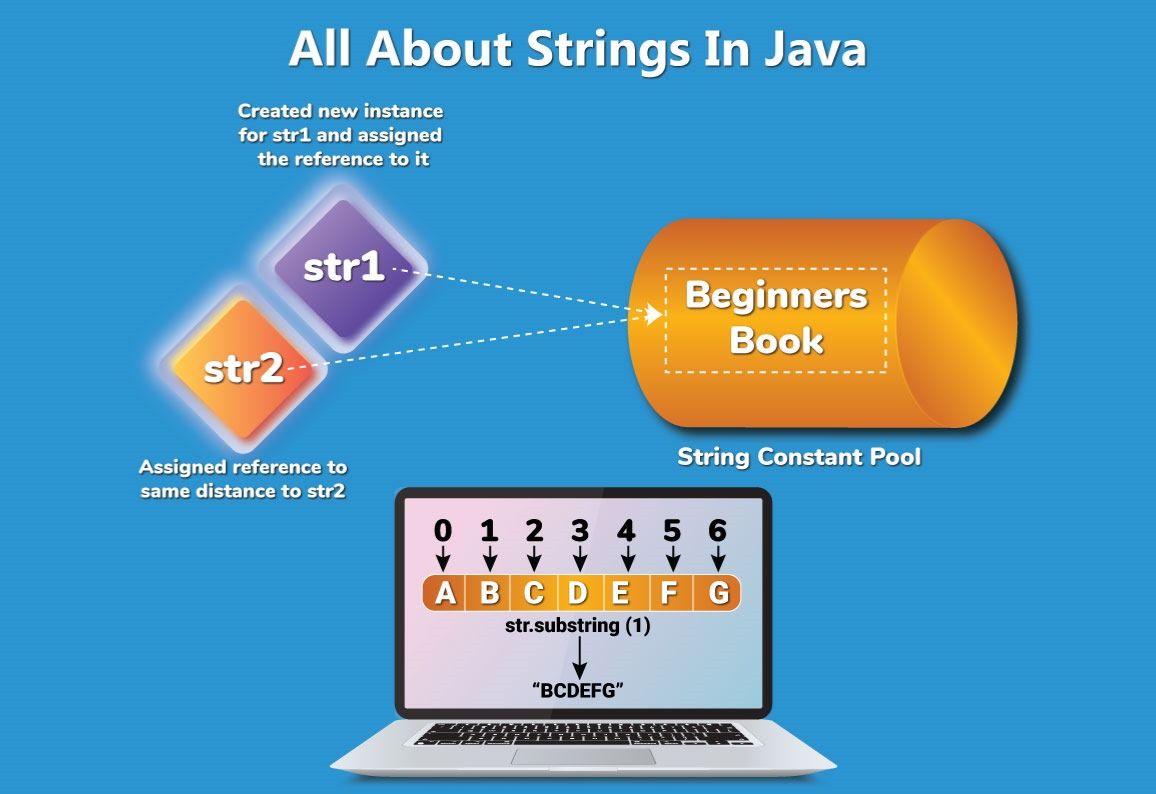
String in Java is immutable and stored in memory pool. Learn about StringBuffer, StringBuilder, and string manipulation techniques in Java.
In Java, String represents a sequence of characters. It is an immutable object, meaning once it is created, its value cannot be modified. If a string is updated, a new String object is created with the same reference. This behavior makes string manipulation in Java memory-efficient and secure.
String str = "India";
System.out.println(str);  // Output: India
String ctr = new String("India");
String ptr = "India";
String ktr = str;
str = str + "n";  // Now str points to a new object
System.out.println(str); // Output: Indian
Number of references: 4 (str, ctr, ptr, ktr)
Number of objects: 3
By string literal:
String str = "India";
By using new keyword:
String ptr = new String("India");
The Java String Pool is a memory area inside the heap where string literals are stored. It helps in memory optimization by avoiding the creation of duplicate strings.
Java provides many built-in string methods in Java that help in manipulating and analyzing string data. These are part of the java.lang.String class.
String str = "Welcome to Cyberinfomines.com";
System.out.println(str);
Frequently Used Java String Functions:
length() – Returns the length of the string.
int size = str.length();
System.out.println("Length: " + size); // 29
charAt(int index) – Returns character at specific index.
substring(int beginIndex) – Extracts substring from beginIndex.
substring(int begin, int end) – Extracts substring from begin to end-1.
indexOf(String s) – Returns first index of given substring.
contains(CharSequence s) – Checks if the string contains a specific sequence.
toUpperCase(), toLowerCase() – Converts string to upper/lowercase.
trim() – Removes leading/trailing whitespace.
split(String regex) – Splits string into array using regex.
concat(String str) – Appends given string.
equals(), equalsIgnoreCase() – Compares strings.
compareTo(), compareToIgnoreCase() – Lexicographic comparison.
hashCode() – Returns hash code.
isEmpty() – Checks if string length is 0.
lastIndexOf() – Finds last index of a character or substring.
valueOf() – Converts different types (boolean, char, int, etc.) to string.
These java string methods are widely used in interview questions and real-world development scenarios.
public class StringBasic {
    public static String getShortName(String firstName, String lastName, String surName) {
        String shortName = firstName.toUpperCase().charAt(0) + "." +
                lastName.toUpperCase().charAt(0) + "." +
                surName.toUpperCase().charAt(0) + surName.toLowerCase().substring(1);
        return shortName;
    }
    public static void main(String[] args) {
        System.out.println(getShortName("Sanjay", "kumar", "Chandel"));
        System.out.println(getShortName("sanjay", "kumar", "chandel"));
        System.out.println(getShortName("SANJAY", "KUMAR", "CHANDEL"));
    }
}
public static void getShortName(String str) {
    String ans = "";
    String[] arr = str.split(" ");
    if (arr.length != 3) {
        System.out.println("Requirement is not enough, pass 3 words");
    } else {
        for (String i : arr) {
            ans += i.toUpperCase().charAt(0);
        }
    }
    System.out.println(ans);
}
Test Inputs:
Input: "Integrated Development Environment" → Output: IDE
Input: "Local area NETWORK" → Output: LAN
public static int palindrome(String st) {
    int start = 0, end = st.length() - 1;
    if (st.length() < 3) return -1;
    for (int i = 0; i < st.length() / 2; i++) {
        if (st.charAt(start) == st.charAt(end)) {
            start++;
            end--;
        } else return 0;
    }
    return 1;
}
Test:
"Madam" → Palindrome
"computer" → Not Palindrome
"Vt" → Input too short
The StringBuffer class represents mutable strings. Unlike String, modifications can be made to the existing object.
StringBuffer buffer = new StringBuffer("Hello");
buffer.append(", World!");
System.out.println(buffer); // Hello, World!
append() – Appends content.
insert() – Inserts content at a specific index.
delete() – Deletes content between start and end.
replace() – Replaces content.
reverse() – Reverses the characters.
Because it is synchronized, StringBuffer is thread-safe and useful in multi-threaded environments.
Both support mutable strings, but they differ in thread safety:
StringBuilder is not synchronized, hence faster in single-threaded applications.
StringBuffer is synchronized, hence safer in multi-threaded applications.
StringBuilder builder = new StringBuilder("Hello");
builder.append(", World!");
System.out.println(builder);
Both support:
append()
insert()
delete()
reverse()
replace()
StringTokenizer is a legacy class in Java used to split strings into tokens.
import java.util.StringTokenizer;
StringTokenizer tokenizer = new StringTokenizer("This is a sample sentence.");
while (tokenizer.hasMoreTokens()) {
    System.out.println(tokenizer.nextToken());
}
Word Count:
int wordCount = new StringTokenizer("This is a sentence").countTokens();
Reverse Words: Use StringBuilder to reverse tokens.
Extract Numbers: Check if token matches digits.
Why is String immutable in Java?
What is the difference between String, StringBuffer and StringBuilder?
How is String Pool implemented in Java?
What happens in memory during string concatenation?
Why is String class final?
How do you create your own immutable class in Java?
How to check if a string is a palindrome without using reverse()?
Find the first non-repeating character in a string.
Count frequency of characters in a string.
Detect anagram strings.
Remove duplicate characters.
These questions test your grasp on string coding questions in Java and help in real-time development as well.
In this article, you learned everything from basic to advanced about string in Java, including java string methods, java string functions, use of StringBuilder vs StringBuffer, and how java tokenization works using StringTokenizer. Understanding these concepts will help you in writing memory-efficient and high-performance Java applications.
Thank you for learning with us! Ready to start your Java journey or level-up your coding skills?
📞 Call us: +91-8587000904, 8587000906, 9643424141
🌐 Visit: www.cyberinfomines.com
📧 Email: vidhya.chandel@cyberinfomines.com